
NRF Connect for Mobile is a powerful generic tool that allows you to scan, advertise, and explore your Bluetooth Low-Energy (BLE) devices and communicate with them. nRF Connect supports the number of Bluetooth SIG adopted profiles together with the Device Firmware Update profile (DFU) from Nordic Semiconductors and Mcu Manager on Zephyr and Mynewt.
- Scans for Bluetooth Low Energy (BLE) devices
What is nRF Connect used for?
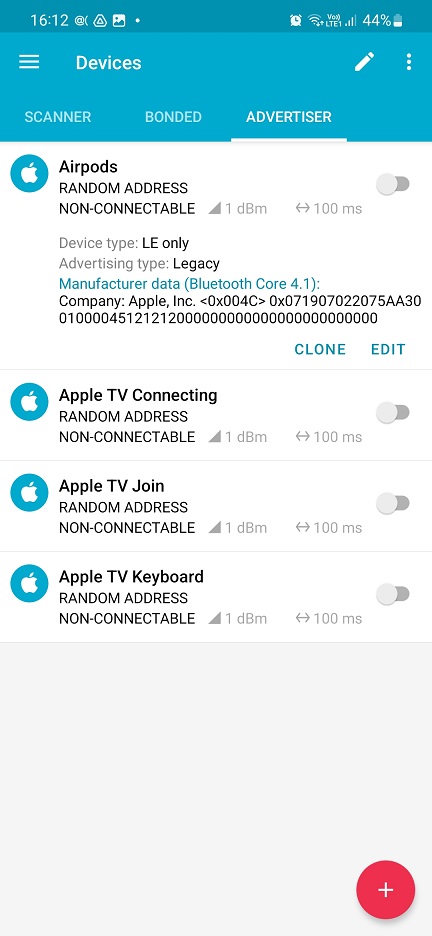
How to Use NRF Connect Mobile
Step 1: Click On Advertiser ---> Plus Button -----> Add Display Name Like Airtag, AirPods pro. Etc.
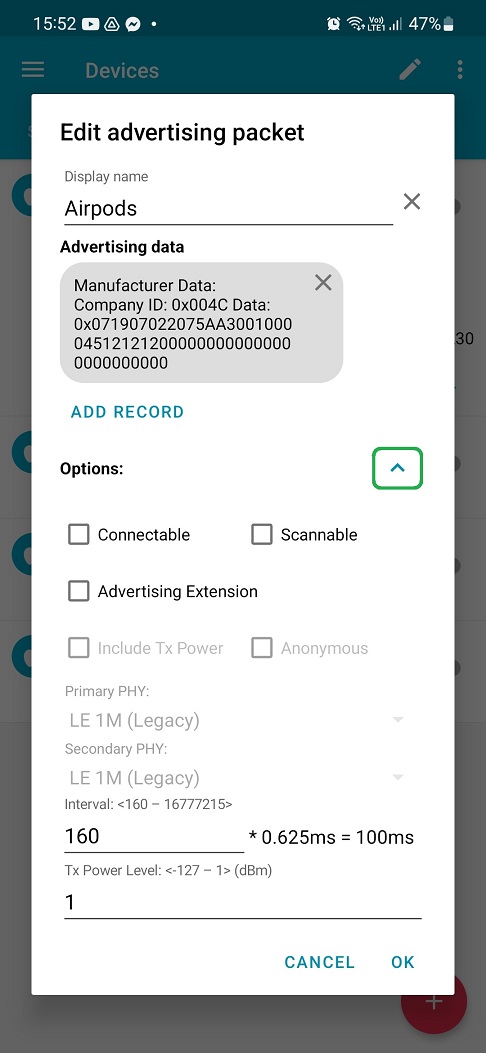
Step 2: Click On Records ----> Manufacturer Data -----> Add Value : 0x004C , He kix Data : Choose Any One ---->( 07 19 01 14 20 55 88 F9 51 00 04 20 50 03 CA D5 C9 AC 0F FA 84 78 94 5A 4D DF F5 ) OR ( 0719050055100000014eca9189f2e68aa8c7dc1e4ac7d331ef52d3 ). ------> PRESS OK
Step 3: Click On Option: replace interval value With 160, ----> Set Tx Power To 1------->
Step 2: Click On Records ----> Manufacturer Data -----> Add Value : 0x004C , He kix Data : Choose Any One ---->( 07 19 01 14 20 55 88 F9 51 00 04 20 50 03 CA D5 C9 AC 0F FA 84 78 94 5A 4D DF F5 ) OR ( 0719050055100000014eca9189f2e68aa8c7dc1e4ac7d331ef52d3 ). ------> PRESS OK
Step 3: Click On Option: replace interval value With 160, ----> Set Tx Power To 1------->
Press Ok
0 Comments